
History: CursWiki08 traducción de artÃculos 1
Preview of version: 21


 Version


Usando Artículos

Como usuario este es un menu simple. Puedes visitar el "Articles Home", ver una lista de artículos, ver rankings, enviar a submisión o ver submisión activas.As a user this is a simple menu. Por supuesto, lo que puedes o no puedes hacer y lo que puedes ver en este menu es configurable.
Si eres administrador clica la link de Editar artículos en el menu de administración para entrar un nuevo artículo.
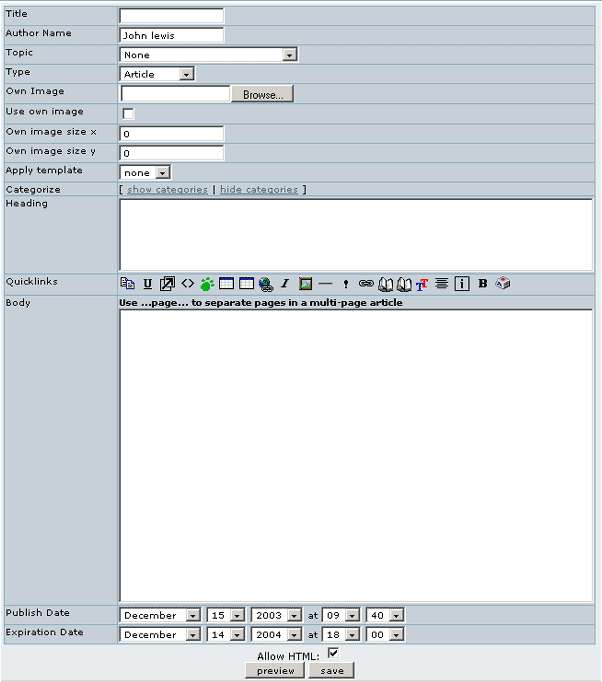
Esta es la pantalla donde puedes editar un artículo existente o crear un nuevo artículo, examinaremos cada campo en detalle:
List Articles
La sección "lista de artículos" muestra una lista de artículos.
You can sort the list by any column, you can filter articles containing some word and if you have the permissions you will se options to edit, read or remove the article. This screen is useful for administrators as well as regular users.
Rankings
In the Rankings page you will access to rankings for the CMS system such as Top Articles, Top Authors, etc. You have to select the ranking to display and the number of records to display and click the view button to see the ranking.
Submit Article
Submitting un artículo es lo mismo que editar un artículo con la diferencia de que el resultado debe ser guardado como un submissionand article is the same as editing an article with the difference that the result will be stored as a submission and not published inmediately as an article. The process to edit and send a submission is the same as editing and article so you should read about editing above articles if you haven't to find out.
View Submissions
You will a list of submissions and if you have the permissions yoy may see links to edit, remove or approve a submission. Una vez que un submission haya sido aprovado, éste se convierte en un artículo.
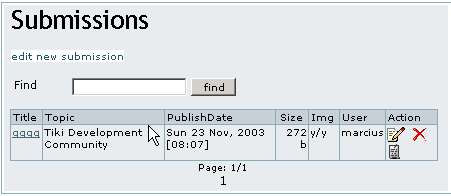
In the Action column, holding your mouse over the icons will indicate which action they will perform.
Table of contents
The Articles menu
Como usuario este es un menu simple. Puedes visitar el "Articles Home", ver una lista de artículos, ver rankings, enviar a submisión o ver submisión activas.As a user this is a simple menu. Por supuesto, lo que puedes o no puedes hacer y lo que puedes ver en este menu es configurable.
Si eres administrador clica la link de Editar artículos en el menu de administración para entrar un nuevo artículo.
Editando o Sometiendo Articulos
Esta es la pantalla donde puedes editar un artículo existente o crear un nuevo artículo, examinaremos cada campo en detalle:
- Título - El título del artículo
- Nombre del Autor - El nombre del autor como debe aparecer en el artículo (puedes usar cualquier nombre aqui)
- Tema - El tema al cual el artículo es asignado. si tu no ves opciones en la caja seleccionada de temas, entonces debes crear primero un tema. Usa la link de administración de temas para crear un tema y entonces vuelve de nuevo a la pantalla de edición de artículos.
- Tipo es el tipo de artículo que se usa.
- Rating - This only shows up for Review articles. Assign a numerical rating to whatever you are reviewing.
List Articles
La sección "lista de artículos" muestra una lista de artículos.
You can sort the list by any column, you can filter articles containing some word and if you have the permissions you will se options to edit, read or remove the article. This screen is useful for administrators as well as regular users.
Rankings
In the Rankings page you will access to rankings for the CMS system such as Top Articles, Top Authors, etc. You have to select the ranking to display and the number of records to display and click the view button to see the ranking.
Submit Article
Submitting un artículo es lo mismo que editar un artículo con la diferencia de que el resultado debe ser guardado como un submissionand article is the same as editing an article with the difference that the result will be stored as a submission and not published inmediately as an article. The process to edit and send a submission is the same as editing and article so you should read about editing above articles if you haven't to find out.
View Submissions
You will a list of submissions and if you have the permissions yoy may see links to edit, remove or approve a submission. Una vez que un submission haya sido aprovado, éste se convierte en un artículo.
In the Action column, holding your mouse over the icons will indicate which action they will perform.
Comparing version with version
| Versions are identical |
History
Col·laboren
![[toggle]](img/icons/module.png "[toggle]")
![[toggle]](javascript:icntoggle('mod-Logos_col_laborenr20','module.png'); "[toggle]")

Traduccions automàtiques
![[toggle]](javascript:icntoggle('mod-Traduccio_internostrumr30','module.png'); "[toggle]")

