
History: CursWiki08 traducción de artÃculos 1
Comparing version 25 with version 41
Usando Artículos Table of contentsThe Articles menu
Como usuario este es un menu simple. Puedes visitar el "Articles Home", ver una lista de artículos, ver rankings, enviar a submisión o ver submisión activas.Por supuesto, lo que puedes o no puedes hacer y lo que puedes ver en este menu es configurable. Si eres administrador clica la link de Editar artículos en el menu de administración para entrar un nuevo artículo. Editando o Sometiendo ArticulosEsta es la pantalla donde puedes editar un artículo existente o crear un nuevo artículo, examinaremos cada campo en detalle: 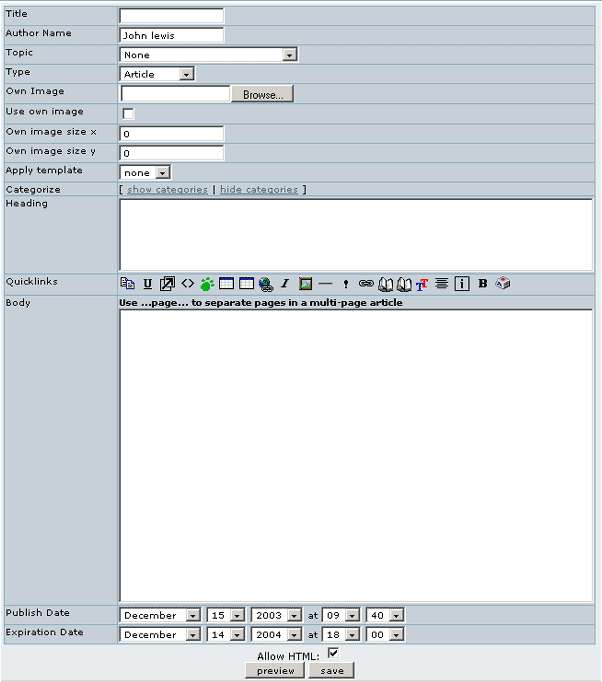
List ArticlesLa sección "lista de artículos" muestra una lista de artículos. You can sort the list by any column, puedes filtrar artículos conteniendo alguna palabra y si tienes los permisos puedes ver las opciones para editar, leer o cambiar el artículo. Esta pantalla es práctica tanto para administradores como para usuarios regulares.you can filter articles containing some word and if you have the permissions you will se options to edit, read or remove the article. This screen is useful for administrators as well as regular users. RankingsIn the Rankings page you will access to rankings for the CMS system such as Top Articles, Top Authors, etc. You have to select the ranking to display and the number of records to display and click the view button to see the ranking. 
Submit ArticleSubmitting un artículo es lo mismo que editar un artículo con la diferencia de que el resultado debe ser guardado como un submissionand article is the same as editing an article with the difference that the result will be stored as a submission and not published inmediately as an article. The process to edit and send a submission is the same as editing and article so you should read about editing above articles if you haven't to find out. View SubmissionsYou will a list of submissions and if you have the permissions yoy may see links to edit, remove or approve a submission. Una vez que un submission haya sido aprovado, éste se convierte en un artículo. 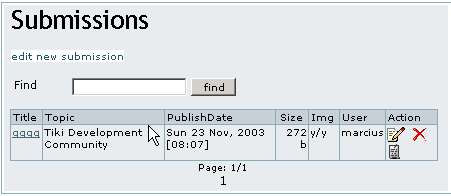
In the Action column, holding your mouse sobre los iconos indicará que acción realizan cada uno de ellos. |
Pàgina extreta de: http://doc.tikiwiki.org/tiki-pagehistory.php?page=Articles+User&preview=18  Acabada (en principi) Movida a: http://doc.tikiwiki.org/Articles+User,es <!-- Llicència de Creative Commons --> <a rel="license" href="http://creativecommons.org/licenses/by-sa/2.1/es/"><img alt="Llicència de Creative Commons" border="0" src="http://creativecommons.org/images/public/somerights20.gif" /></a><br /> Copyright 2005 Carolina Delcourt & Alexandre de Buen Aquesta obra està sota una <a rel="license" href="http://creativecommons.org/licenses/by-sa/2.1/es/">Llicència de Creative Commons</a>. <!-- /Llicència de Creative Commons --> <!-- <rdf:RDF xmlns="http://web.resource.org/cc/" xmlns:dc="http://purl.org/dc/elements/1.1/" xmlns:rdf="http://www.w3.org/1999/02/22-rdf-syntax-ns#"> <Work rdf:about=""> <dc:type rdf:resource="http://purl.org/dc/dcmitype/Text" /> <license rdf:resource="http://creativecommons.org/licenses/by-sa/2.1/es/" /> </Work> <License rdf:about="http://creativecommons.org/licenses/by-sa/2.1/es/"> <permits rdf:resource="http://web.resource.org/cc/Reproduction" /> <permits rdf:resource="http://web.resource.org/cc/Distribution" /> <requires rdf:resource="http://web.resource.org/cc/Notice" /> <requires rdf:resource="http://web.resource.org/cc/Attribution" /> <permits rdf:resource="http://web.resource.org/cc/DerivativeWorks" /> <requires rdf:resource="http://web.resource.org/cc/ShareAlike" /> </License> </rdf:RDF> --> |
||


History
Col·laboren

Traduccions automàtiques

